
こんにちは。Tomoyuki(@tomoyuki65)です。
WebサービスにおけるデータベースといえばRDB(リレーショナルデータベース)が基本ですが、非構造的なデータを扱いたい場合や、頻繁にデータ更新が必要な場合、そしてリアルタイム性(低遅延、即時同期)が求められるような場合においては、NoSQLを利用した方がよかったりします。
※NoSQLが有効な場面の具体例としては、LINEのようなチャットのメッセージ保存や、IoT(モノをインターネットに繋ぐ仕組み)の大量の非構造化データのリアルタイム保存など。
そんなNoSQLのサービスとしては、例えばGoogle Cloudなら「Cloud Firestore」があり、無料枠もあったりして個人開発等でもよく利用されたりしています。
そこでこの記事では、Go言語(Golang)でGoogle Cloud Firestore(NoSQL)の使い方についてまとめます。
Go言語(Golang)でGoogle Cloud Firestore(NoSQL)の使い方|Docker環境構築+CRUD APIサンプル
まずは以下のコマンドを実行し、各種ファイルを作成します。
$ mkdir go-firestore && cd go-firestore
$ mkdir -p docker/local/go && touch docker/local/go/Dockerfile
$ mkdir -p docker/local/db && touch docker/local/db/Dockerfile
$ mkdir src && touch src/main.go
$ touch .env firebase.json compose.yml
次に作成したファイルをそれぞれ以下のように記述します。
・「docker/local/go/Dockerfile」
FROM golang:1.26.1-alpine3.23

WORKDIR /go/src

COPY ./src .

# go.modがあれば依存関係をインストール
RUN if [ -f ./go.mod ]; then \
      go install; \
    fi

# 開発用のライブラリをインストール
RUN go install github.com/air-verse/air@v1.64.5
RUN go install honnef.co/go/tools/cmd/staticcheck@latest

EXPOSE 8081
※今回はポート番号を8081にしています。
・「docker/local/db/Dockerfile」
FROM ubuntu:26.04

WORKDIR /app

# 必要パッケージのインストール
RUN apt-get update && \
    apt-get install -y --no-install-recommends \
      curl \
      gnupg \
      openjdk-21-jre-headless \
      ca-certificates && \
    # Node.js v24をインストール
    curl -fsSL https://deb.nodesource.com/setup_24.x | bash - && \
    apt-get update && \
    apt-get install -y --no-install-recommends nodejs && \
    apt-get clean && \
    rm -rf /var/lib/apt/lists/*

# Firebase CLIのインストール
RUN npm install -g firebase-tools

# 設定ファイルのコピー
COPY firebase.json .

EXPOSE 4000 8080 9150
※ローカル開発環境として構築するFirestoreについては、Firebase CLIのFirebase Local Emulator Suiteを利用して構築します。
・「src/main.go」
package main

import (
    "log/slog"
    "net/http"

    "github.com/labstack/echo/v4"
)

func main() {
    // echoのルーター設定
    e := echo.New()

    e.GET("/", func(c echo.Context) error {
        // レスポンス結果の設定
        res := map[string]string{
            "message": "Hello World !!",
        }

        return c.JSON(http.StatusOK, res)
    })

    // ログ出力
    slog.Info("start go-firestore")

    // サーバー起動
    e.Logger.Fatal(e.Start(":8081"))
}
※今回はポート番号を8081にしています。
・「.env」
ENV=local
GOOGLE_APPLICATION_CREDENTIALS=""
GOOGLE_CLOUD_PROJECT_ID="demo-project"
※本番環境の場合は、環境変数「GOOGLE_APPLICATION_CREDENTIALS」を利用して認証情報を設定する想定です。(ローカル開発環境では使いません)
・「firebase.json」
{
  "emulators": {
    "firestore": {
      "port": 8080,
      "host": "0.0.0.0"
    },
    "ui": {
      "enabled": true,
      "port": 4000,
      "host": "0.0.0.0"
    }
  }
}
※Firebase Local Emulator Suite用の設定ファイルです。
・「compose.yml」
services:
  api:
    container_name: go-firestore-api
    build:
      context: .
      dockerfile: ./docker/local/go/Dockerfile
    command: air -c .air.toml
    volumes:
      - ./src:/go/src
    ports:
      - "8081:8081"
    env_file:
      - .env
    environment:
      FIRESTORE_EMULATOR_HOST: firestore:8080
    tty: true
    stdin_open: true
    depends_on:
      - firestore
  firestore:
    container_name: go-firestore-db
    build:
      context: .
      dockerfile: ./docker/local/db/Dockerfile
    command: >
      firebase emulators:start
      --only firestore
      --project demo-project
      --import=./data/export
      --export-on-exit
    volumes:
      - ./firebase.json:/app/firebase.json
      - firestore_data:/app/data
    ports:
      - "4000:4000" # Emulator UI
      - "8080:8080" # Firestore Emulator
      - "9150:9150" # Firestore WebSocket
volumes:
  firestore_data:
※apiコンテナからfirestoreコンテナへの接続については、apiコンテナに環境変数「FIRESTORE_EMULATOR_HOST」を設定すると可能です。
次に以下のコマンドを実行し、Dockerコンテナをビルドします。
$ docker compose build --no-cache
次に以下のコマンドを実行し、Go言語の初期化処理を行います。
$ docker compose run --rm api go mod init go-firestore
$ docker compose run --rm api go mod tidy
$ docker compose run --rm api air init
次に以下のコマンドを実行し、Dockerコンテナの再ビルドと起動を行います。
$ docker compose build --no-cache
$ docker compose up -d
次に以下のコマンドを実行し、Dockerコンテナの起動を確認します。
$ docker compose ps
コマンド実行後、以下のようにapiとfirestoreのコンテナがそれぞれ起動していればOKです。

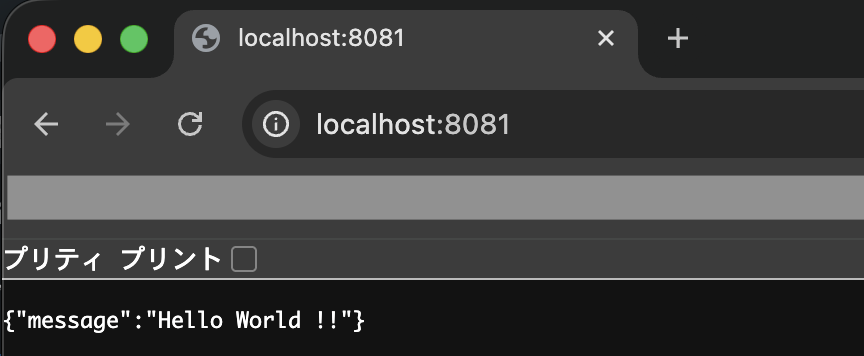
次にブラウザで「http://localhost:8081」を開き、JSON形式で想定通りのメッセージが出力されていればOKです。
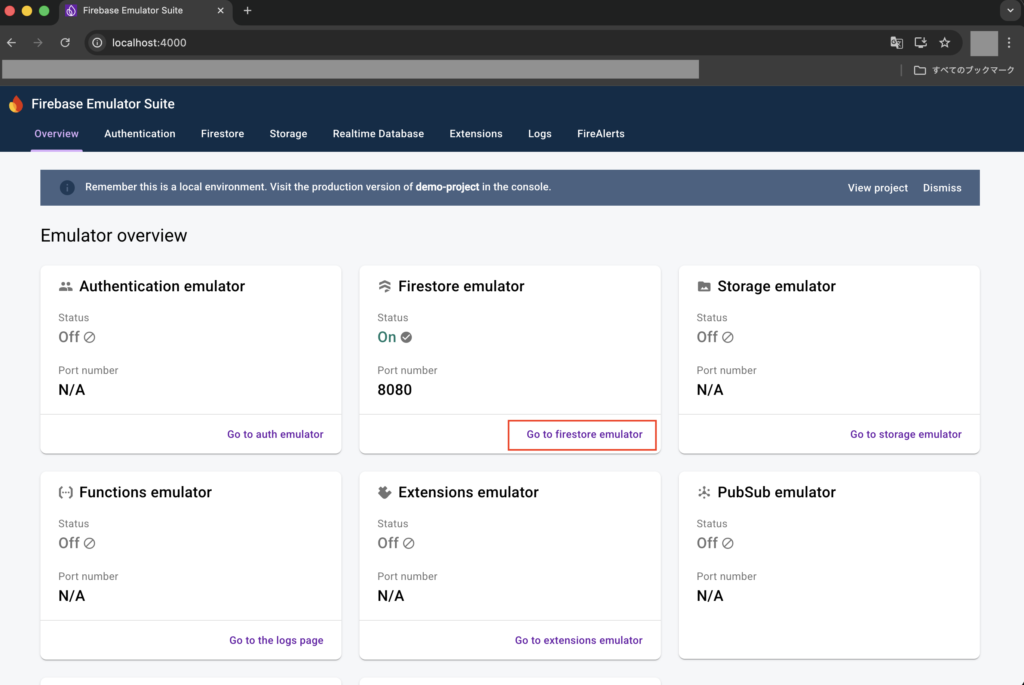
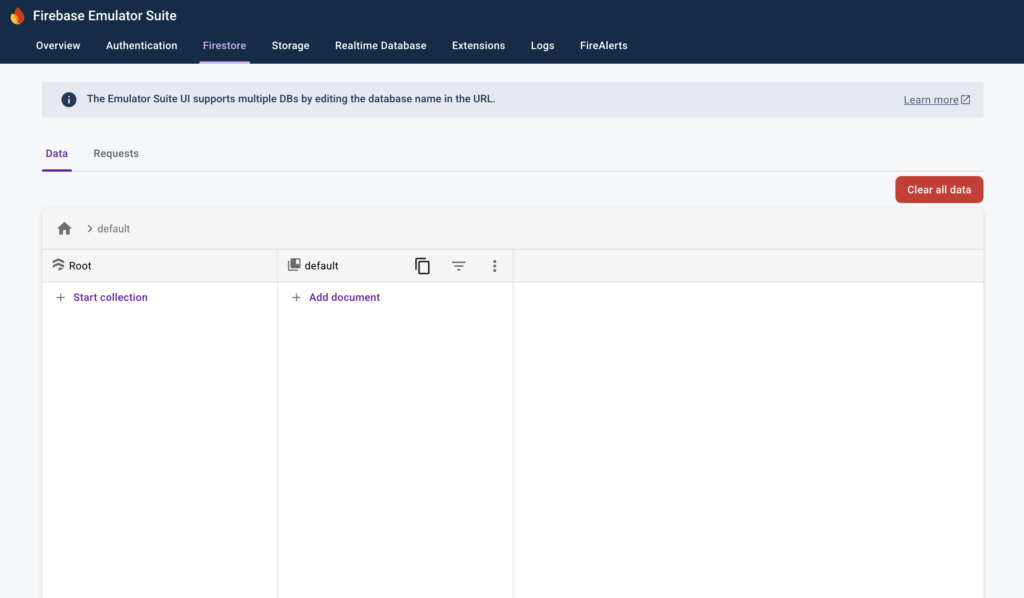
次にブラウザで「http://localhost:4000」を開き、Firebase Emulator Suiteの画面が表示されればOKです。
Firestore emulatorを利用する場合は、「Go to Firestore emulator」をクリックします。
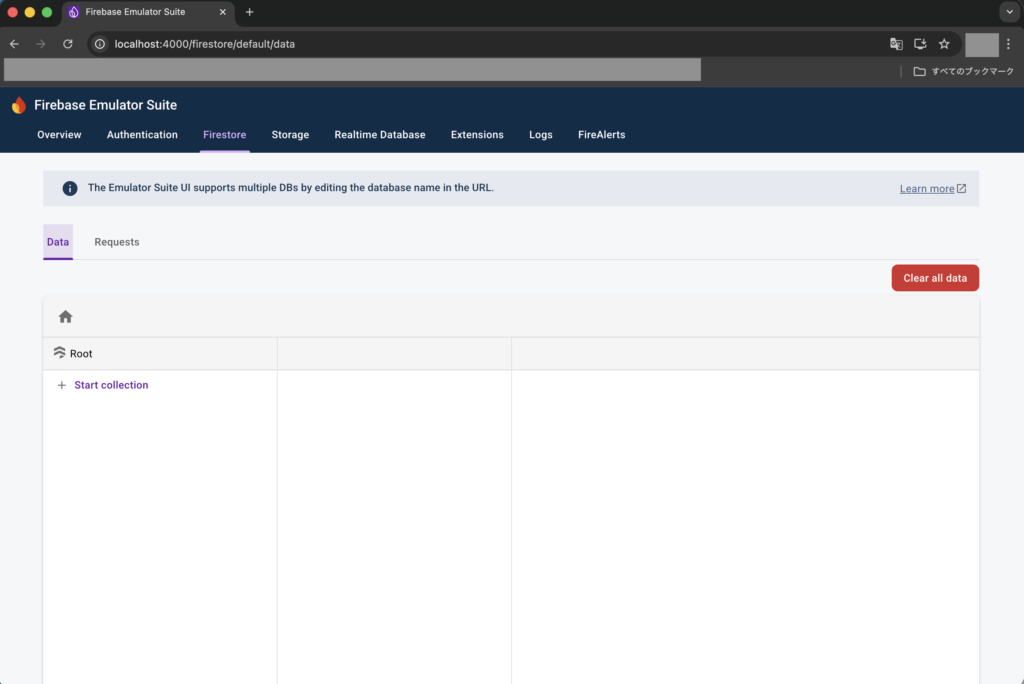
これでFirestore emulatorの画面が表示され、ここからデータ登録や確認等が行えます。
Firebase Emulator SuiteのFirestore emulatorの使い方
コレクションの作成
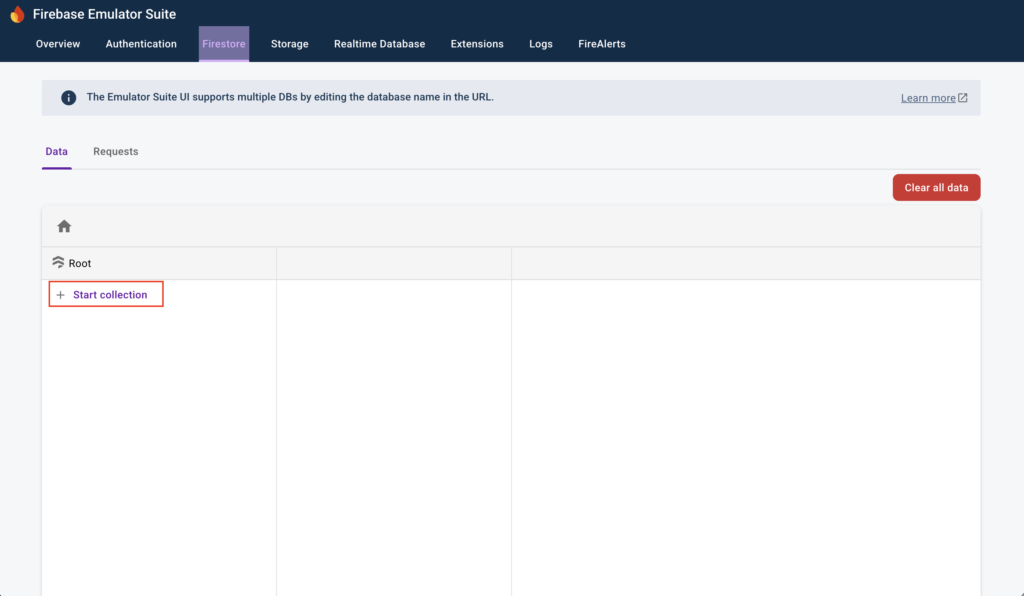
Firestore emulator画面の「Start collection」をクリックすると、コレクションの作成が可能です。
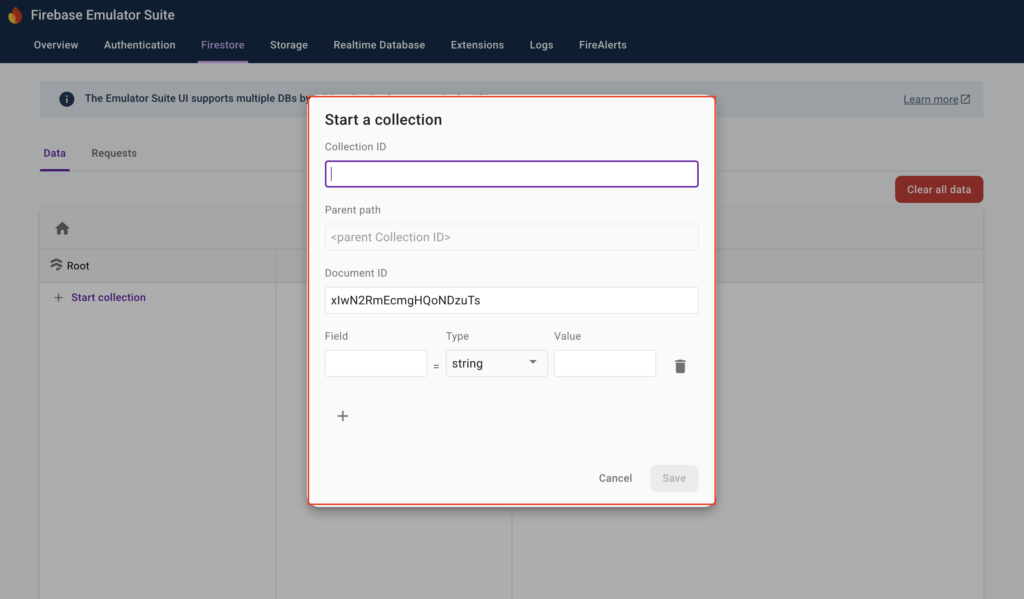
ポップアップが表示され、コレクションやフィールドの設定が可能です。
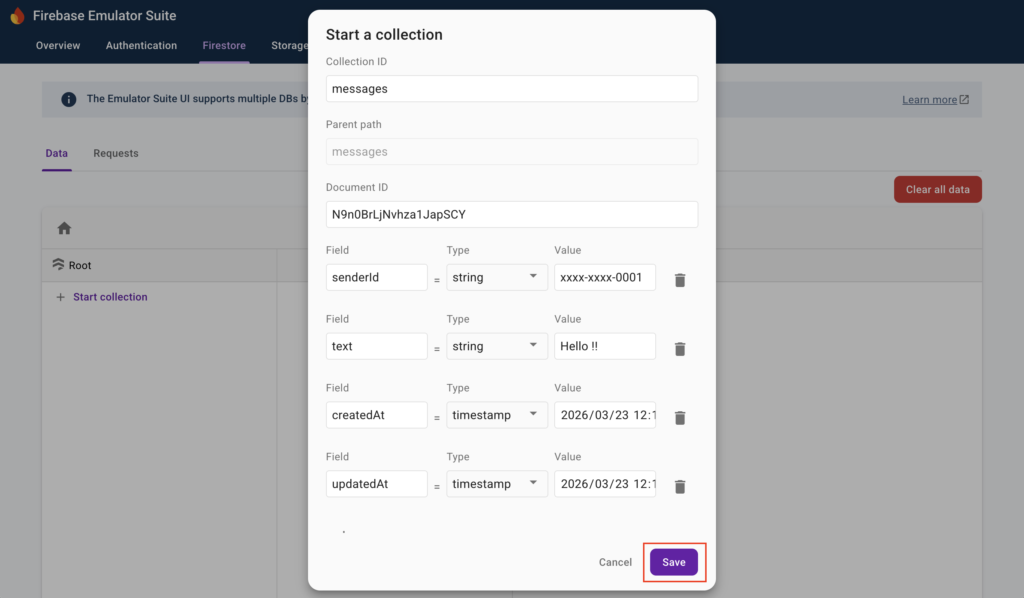
例えばメッセージを保存するコレクション「messages」を想定して以下のように設定後、「Save」をクリックします。
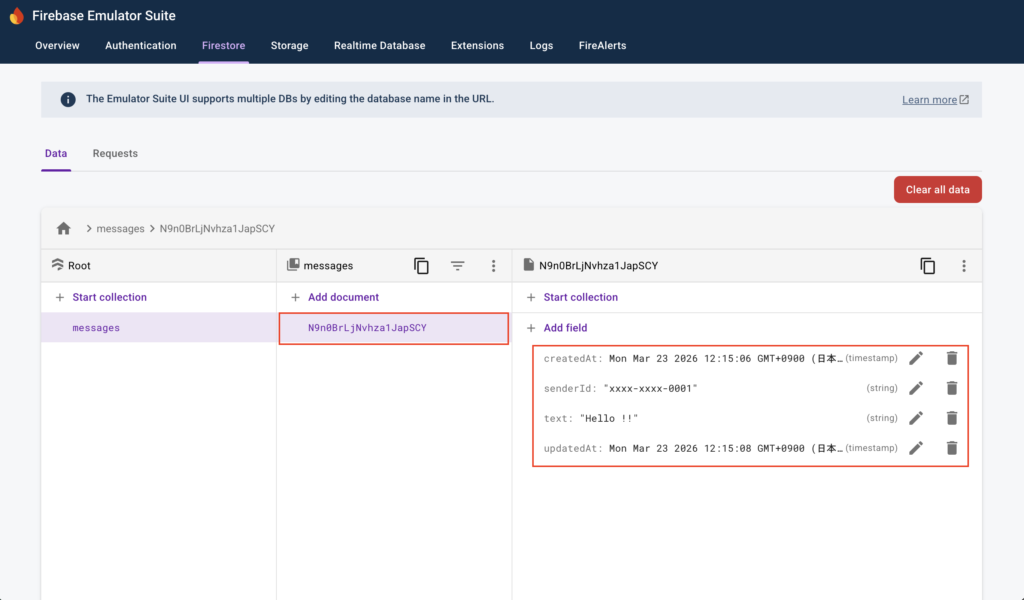
保存後、下図のようにコレクションおよびドキュメントのデータが作成されます。
ドキュメントの修正および、ドキュメント削除やフィールド削除
ドキュメントの詳細部分にフィールドの更新や削除ボタン、そして上記に「+Add field」や「+Start collection」ボタンがあり、ドキュメントの修正が可能です。
また、ドキュメントIDの右にある「︙」をクリックするとメニューを表示できます。
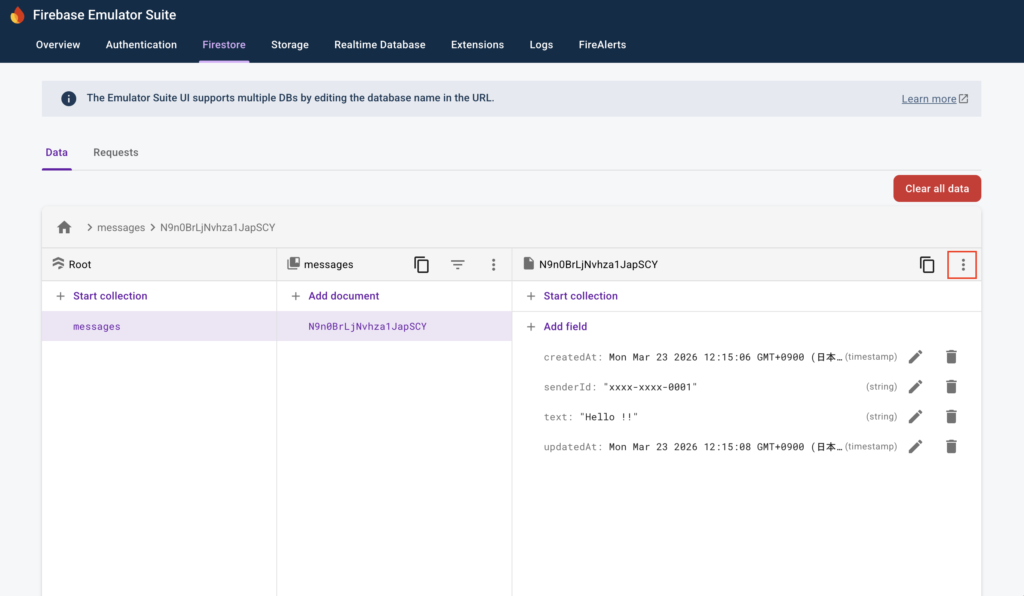
※ドキュメントの詳細部分の上部にある「+Start collection」ボタンから、ドキュメントに対してサブコレクションを追加することもできます。ただし、複雑な構造にするのには向いていないので、その点は注意しましょう。
メニューには「Delete document」や「Delete all fields」があります。
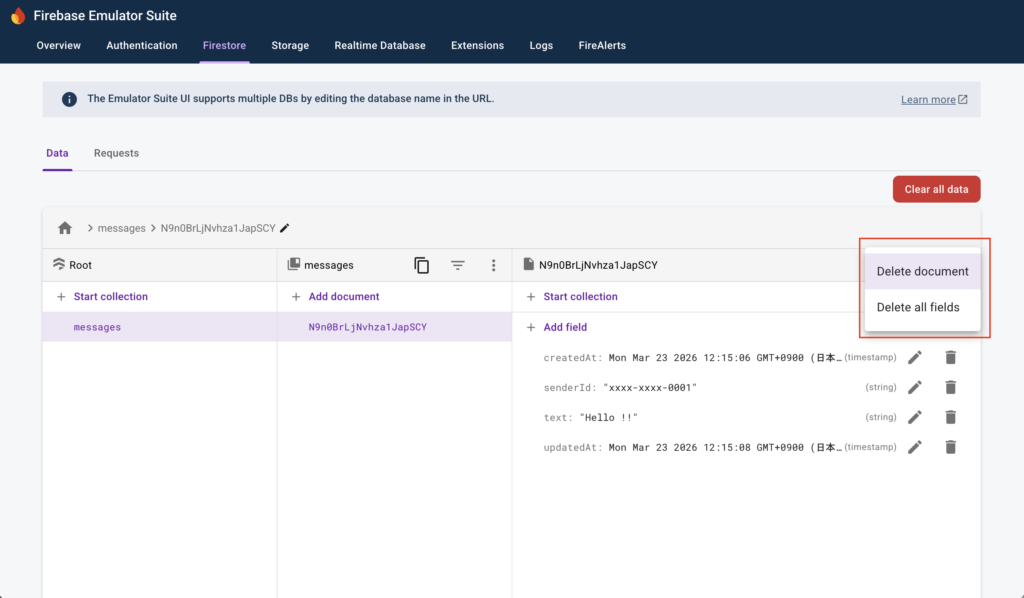
全てのデータを削除
もし全てのデータを削除したい場合は、画面右上にある「Clear all data」をクリックします。
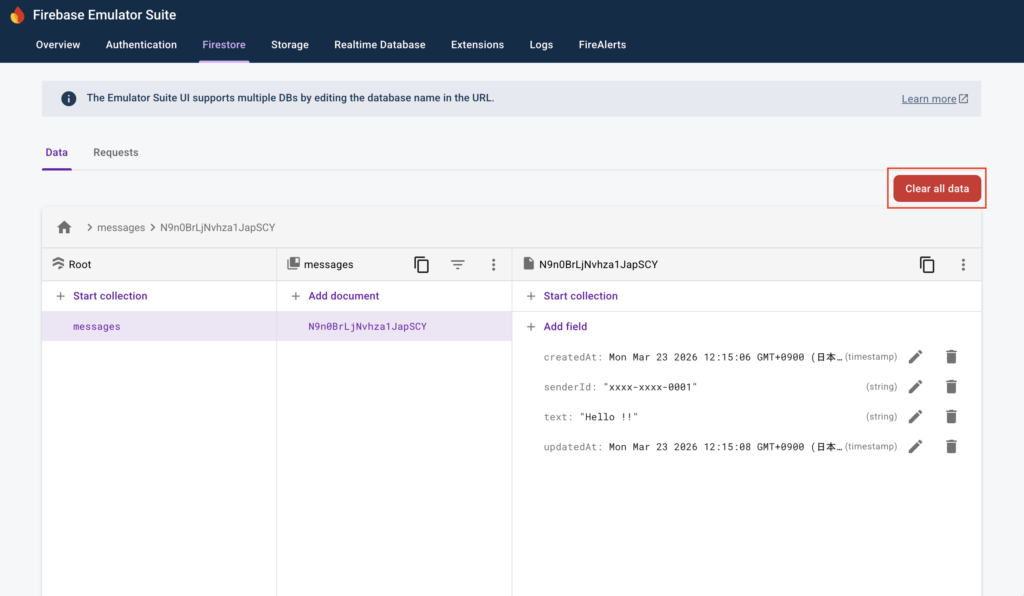
ポップアップが表示されるので、「Clear」をクリックします。
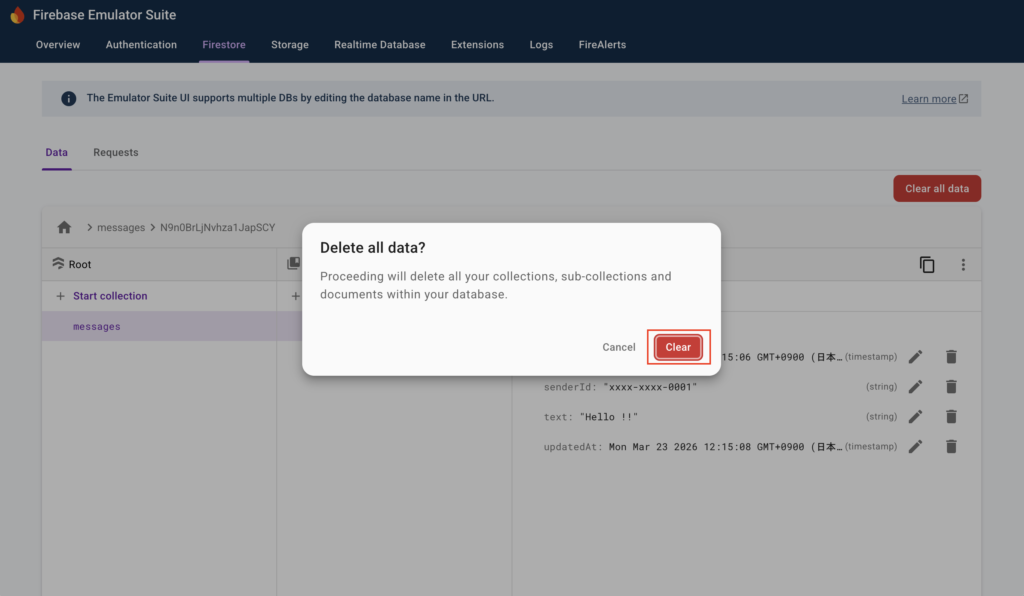
これで全てのデータの削除が完了です。
Go言語(Golang)でFirestoreを操作するCRUDのAPIサンプルを作って試す
次にGo言語(Golang)でFirestoreを操作するCRUDのAPIサンプルを作って試します。
まずは以下のコマンドを実行し、各種ファイルを作成します。
$ mkdir -p src/internal/infrastructure/database && touch src/internal/infrastructure/database/firestore.go
$ mkdir -p src/internal/infrastructure/persistence/firestore/message && touch src/internal/infrastructure/persistence/firestore/message/message_document.go
次に作成したファイルをそれぞれ以下のように記述します。
・「src/internal/infrastructure/database/firestore.go」
package database

import (
    "context"
    "os"

    "cloud.google.com/go/firestore"
)

func NewFirestoreClient(ctx context.Context) (*firestore.Client, error) {
    projectID := os.Getenv("GOOGLE_CLOUD_PROJECT_ID")

    return firestore.NewClient(ctx, projectID)
}
※これはFirestoreへの接続用の設定ファイルです。
・「src/internal/infrastructure/persistence/firestore/message/message_document.go」
package message

import (
    "time"
)

type MessageDocument struct {
    SenderID  string    `firestore:"senderId"`
    Text      string    `firestore:"text"`
    CreatedAt time.Time `firestore:"createdAt"`
    UpdatedAt time.Time `firestore:"updatedAt"`
}
※これはFirestoreのコレクションをGoへマッピングするための構造体を定義するファイルです。今回は例としてメッセージを保存するコレクション「messages」を想定しています。ファイルの格納場所については、DDD構成(ドメイン駆動設計)を想定し、「infrastructure/persistence」配下に作成しています。
次にファイル「src/main.go」を以下のように修正します。
package main

import (
    "context"
    "fmt"
    "log/slog"
    "net/http"
    "os"
    "time"

    "cloud.google.com/go/firestore"
    "github.com/labstack/echo/v4"
    "google.golang.org/api/iterator"
    "google.golang.org/grpc/codes"
    "google.golang.org/grpc/status"

    "go-firestore/internal/infrastructure/database"
    "go-firestore/internal/infrastructure/persistence/firestore/message"
)

// メッセージ作成用リクエストボディの構造体
type CreateMessagesRequestBody struct {
    UID string `json:"uid"`
    Text string `json:"text"`
}

// メッセージ更新用リクエストボディの構造体
type UpdateMessagesRequestBody struct {
    SenderID string `json:"senderId"`
    Text string `json:"text"`
}

// メッセージのレスポンス結果用の構造体
type MessageResponse struct {
    ID string `json:"id"`
    SenderID string `json:"senderId"`
    Text string `json:"text"`
    CreatedAt time.Time `json:"createdAt"`
    UpdatedAt time.Time `json:"updatedAt"`
}

func main() {
    // echoのルーター設定
    e := echo.New()

    e.GET("/", func(c echo.Context) error {
        // レスポンス結果の設定
        res := map[string]string{
            "message": "Hello World !!",
        }

        return c.JSON(http.StatusOK, res)
    })

    // Firestoreクライアント取得
    ctx := context.Background()
    client, err := database.NewFirestoreClient(ctx)
    if err != nil {
        slog.Error(fmt.Sprintf("failed to create Firestore client: %v", err))
        os.Exit(1)
    }
    defer client.Close()

    // サンプルAPI(CRUD処理)を追加
    apiV1 := e.Group("/api/v1")

    // メッセージ作成
    apiV1.POST("/messages", func(c echo.Context) error {
        // リクエストボディの取得
        var reqBody CreateMessagesRequestBody
        if err := c.Bind(&reqBody); err != nil {
            return err
        }

        ctx := c.Request().Context()

        // ドキュメント作成
        docRef, _, err := client.Collection("messages").Add(ctx, map[string]interface{}{
            "senderId": reqBody.UID,
            "text": reqBody.Text,
            "createdAt": time.Now(),
            "updatedAt": time.Now(),
        })
        if err != nil {
            errMsg := fmt.Sprintf("failed adding a new message: %v", err)
            return echo.NewHTTPError(http.StatusInternalServerError, errMsg)
        }

        // ドキュメント結果の取得
        docSnap, err := docRef.Get(ctx)
        if err != nil {
            errMsg := fmt.Sprintf("failed to get a new message: %v", err)
            return echo.NewHTTPError(http.StatusInternalServerError, errMsg)
        }

        // マッピング
        var msgDoc message.MessageDocument
        if err := docSnap.DataTo(&msgDoc); err != nil {
            errMsg := fmt.Sprintf("failed to DataTo struct: %v", err)
            return echo.NewHTTPError(http.StatusInternalServerError, errMsg)
        }

        // レスポンス結果の設定
        message := MessageResponse{
            ID: docSnap.Ref.ID,
            SenderID: msgDoc.SenderID,
            Text: msgDoc.Text,
            CreatedAt: msgDoc.CreatedAt,
            UpdatedAt: msgDoc.UpdatedAt,
        }

        return c.JSON(http.StatusCreated, message)
    })

    // 全てのメッセージ取得
    apiV1.GET("/messages", func(c echo.Context) error {
        ctx := c.Request().Context()

        // イテレーター取得
        iter := client.Collection("messages").Documents(ctx)
        defer iter.Stop()

        // メッセージ取得処理
        var messages []MessageResponse

        for {
            // ドキュメント取得
            doc, err := iter.Next()
            if err == iterator.Done {
                break
            }
            if err != nil {
                errMsg := fmt.Sprintf("failed to iterate the list of messages: %v", err)
                return echo.NewHTTPError(http.StatusInternalServerError, errMsg)
            }

            // マッピング
            var msgDoc message.MessageDocument
            if err := doc.DataTo(&msgDoc); err != nil {
                errMsg := fmt.Sprintf("failed to DataTo struct: %v", err)
                return echo.NewHTTPError(http.StatusInternalServerError, errMsg)
            }

            // レスポンス結果の設定
            msgRes := MessageResponse{
                ID: doc.Ref.ID,
                SenderID: msgDoc.SenderID,
                Text: msgDoc.Text,
                CreatedAt: msgDoc.CreatedAt,
                UpdatedAt: msgDoc.UpdatedAt,
            }

            messages = append(messages, msgRes)
        }

        // データが0件の場合、空の配列を設定
        if len(messages) == 0 {
            messages = []MessageResponse{}
        }

        return c.JSON(http.StatusOK, messages)
    })

    // 対象のメッセージ取得
    apiV1.GET("/messages/:id", func(c echo.Context) error {
        // リクエストパラメータの取得
        id := c.Param("id")
        if id == "" {
            return echo.NewHTTPError(http.StatusBadRequest, "id is required")
        }

        ctx := c.Request().Context()

        // 対象データ取得
        docSnap, err := client.Collection("messages").Doc(id).Get(ctx)
        if err != nil {
            // 対象データが存在しない場合は空のオブジェクトを返す
            st, ok := status.FromError(err)
            if ok && st.Code() == codes.NotFound {
                return c.JSON(http.StatusOK, map[string]interface{}{})
            } else {
                errMsg := fmt.Sprintf("failed to get a message: %v", err)
                return echo.NewHTTPError(http.StatusInternalServerError, errMsg)
            }
        }

        // マッピング
        var msgDoc message.MessageDocument
        if err := docSnap.DataTo(&msgDoc); err != nil {
            errMsg := fmt.Sprintf("failed to DataTo struct: %v", err)
            return echo.NewHTTPError(http.StatusInternalServerError, errMsg)
        }

        // レスポンス結果の設定
        message := MessageResponse{
            ID: docSnap.Ref.ID,
            SenderID: msgDoc.SenderID,
            Text: msgDoc.Text,
            CreatedAt: msgDoc.CreatedAt,
            UpdatedAt: msgDoc.UpdatedAt,
        }

        return c.JSON(http.StatusOK, message)
    })

    // 対象メッセージ更新
    apiV1.PUT("/messages/:id", func(c echo.Context) error {
        // リクエストパラメータの取得
        id := c.Param("id")
        if id == "" {
            return echo.NewHTTPError(http.StatusBadRequest, "id is required")
        }

        // リクエストボディの取得
        var reqBody UpdateMessagesRequestBody
        if err := c.Bind(&reqBody); err != nil {
            return err
        }

        ctx := c.Request().Context()

        // 更新処理(トランザクション利用)
        docRef := client.Collection("messages").Doc(id)

        err = client.RunTransaction(ctx, func(ctx context.Context, tx *firestore.Transaction) error {
            docSnap, err := tx.Get(docRef)
            if err != nil {
                // 対象データが存在しない場合は404エラー
                st, ok := status.FromError(err)
                if ok && st.Code() == codes.NotFound {
                    return echo.NewHTTPError(http.StatusNotFound, "message not found")
                } else {
                    errMsg := fmt.Sprintf("failed to get a message: %v", err)
                    return echo.NewHTTPError(http.StatusInternalServerError, errMsg)
                }
            }

            // マッピング
            var msgDoc message.MessageDocument
            if err := docSnap.DataTo(&msgDoc); err != nil {
                errMsg := fmt.Sprintf("failed to DataTo struct: %v", err)
                return echo.NewHTTPError(http.StatusInternalServerError, errMsg)
            }

            // senderIdの認可チェック
            if reqBody.SenderID != msgDoc.SenderID {
                return echo.NewHTTPError(http.StatusForbidden, "forbidden")
            }

            // 更新処理
            return tx.Update(docRef, []firestore.Update{
                {Path: "text", Value: reqBody.Text},
                {Path: "updatedAt", Value: time.Now()},
            })
        })
        if err != nil {
            return err
        }

        // 更新データ取得
        docSnap, err := docRef.Get(ctx)
        if err != nil {
            errMsg := fmt.Sprintf("failed to get a message: %v", err)
            return echo.NewHTTPError(http.StatusInternalServerError, errMsg)
        }

        // マッピング
        var msgDoc message.MessageDocument
        if err := docSnap.DataTo(&msgDoc); err != nil {
            errMsg := fmt.Sprintf("failed to DataTo struct: %v", err)
            return echo.NewHTTPError(http.StatusInternalServerError, errMsg)
        }

        // レスポンス結果の設定
        message := MessageResponse{
            ID: docSnap.Ref.ID,
            SenderID: msgDoc.SenderID,
            Text: msgDoc.Text,
            CreatedAt: msgDoc.CreatedAt,
            UpdatedAt: msgDoc.UpdatedAt,
        }

        return c.JSON(http.StatusOK, message)
    })

    // 対象メッセージ削除
    apiV1.DELETE("/messages/:id", func(c echo.Context) error {
        // リクエストパラメータの取得
        id := c.Param("id")
        if id == "" {
            return echo.NewHTTPError(http.StatusBadRequest, "id is required")
        }

        ctx := c.Request().Context()

        // 対象データの存在チェック
        _, err = client.Collection("messages").Doc(id).Get(ctx)
        if err != nil {
            // 対象データが存在しない場合は空のオブジェクトを返す
            st, ok := status.FromError(err)
            if ok && st.Code() == codes.NotFound {
                return echo.NewHTTPError(http.StatusNotFound, "message not found")
            } else {
                errMsg := fmt.Sprintf("failed to get a message: %v", err)
                return echo.NewHTTPError(http.StatusInternalServerError, errMsg)
            }
        }

        // 対象データ削除
        _, err = client.Collection("messages").Doc(id).Delete(ctx)
        if err != nil {
            errMsg := fmt.Sprintf("failed to delete a message: %v", err)
            return echo.NewHTTPError(http.StatusInternalServerError, errMsg)
        }

        return c.NoContent(http.StatusNoContent)
    })

    // ログ出力
    slog.Info("start go-firestore")

    // サーバー起動
    e.Logger.Fatal(e.Start(":8081"))
}
※ドキュメントのIDは自動でマッピングできず、別途設定する必要があります。
次に以下のコマンドを実行し、go.modの更新からDockerコンテナの再ビルドおよび再起動を行います。
$ docker compose exec api go mod tidy
$ docker compose down -v
$ docker compose build --no-cache
$ docker compose up -d
サンプルAPIを実行して試す
次に上記で作成したサンプルAPIをPostmanを使って試します。
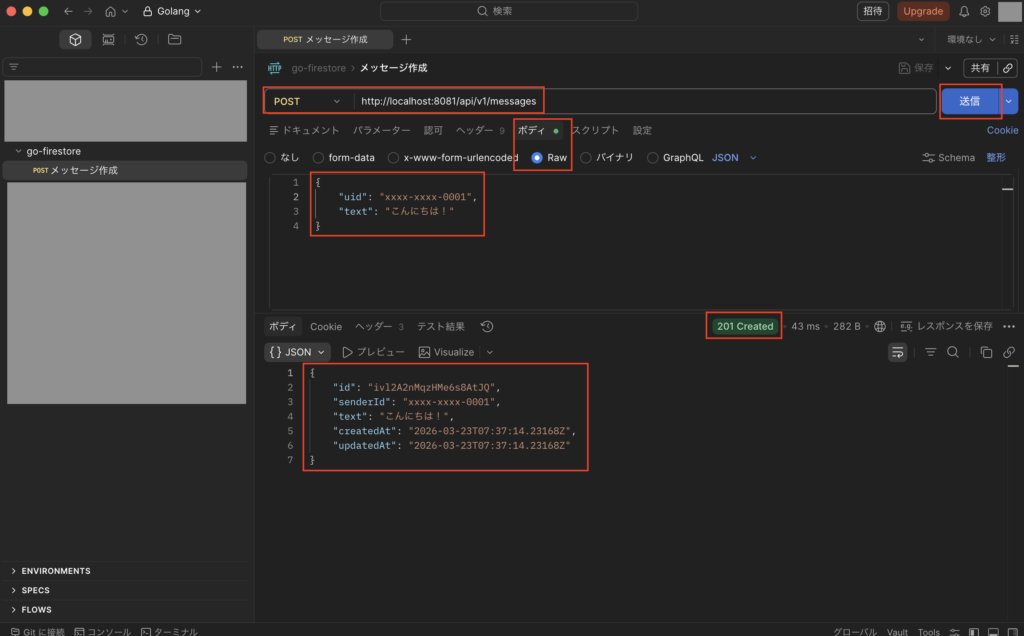
まずはPOSTメソッドで「http://localhost:8081/api/v1/messages」を実行し、下図のようにステータス201で想定通りの結果になればOKです。
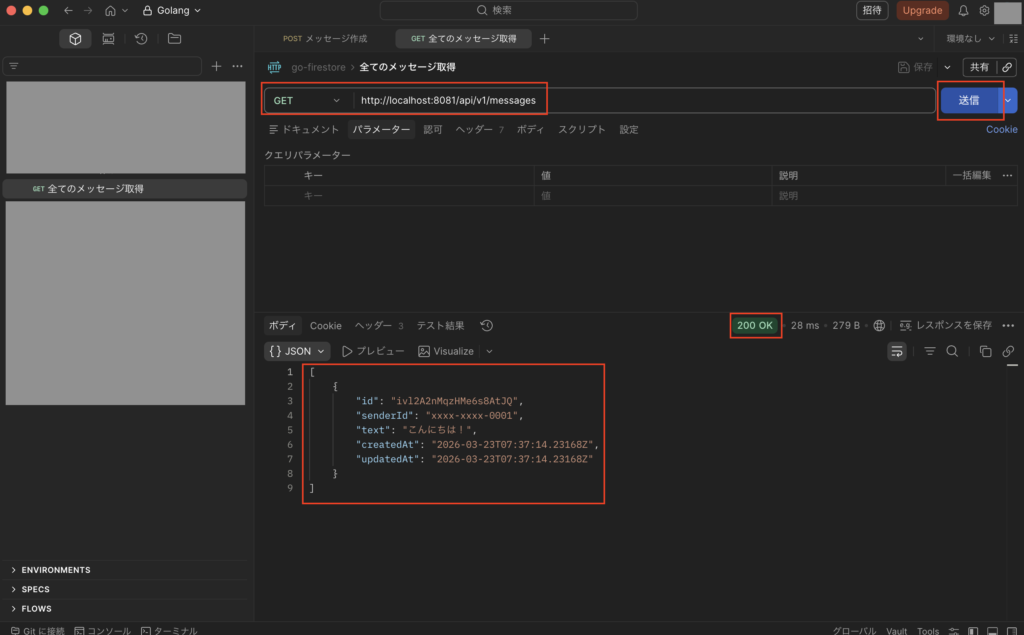
次にGETメソッドで「http://localhost:8081/api/v1/messages」を実行し、下図のようにステータス200で想定通りの結果になればOKです。
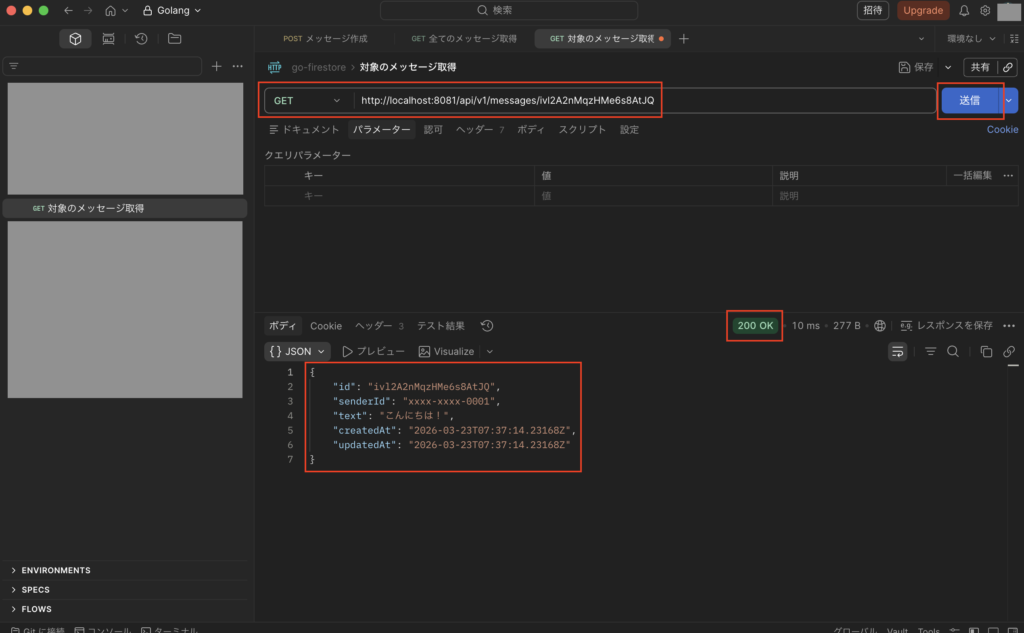
次にGETメソッドで「http://localhost:8081/api/v1/messages/{対象データのid}」を実行し、下図のようにステータス200で想定通りの結果になればOKです。
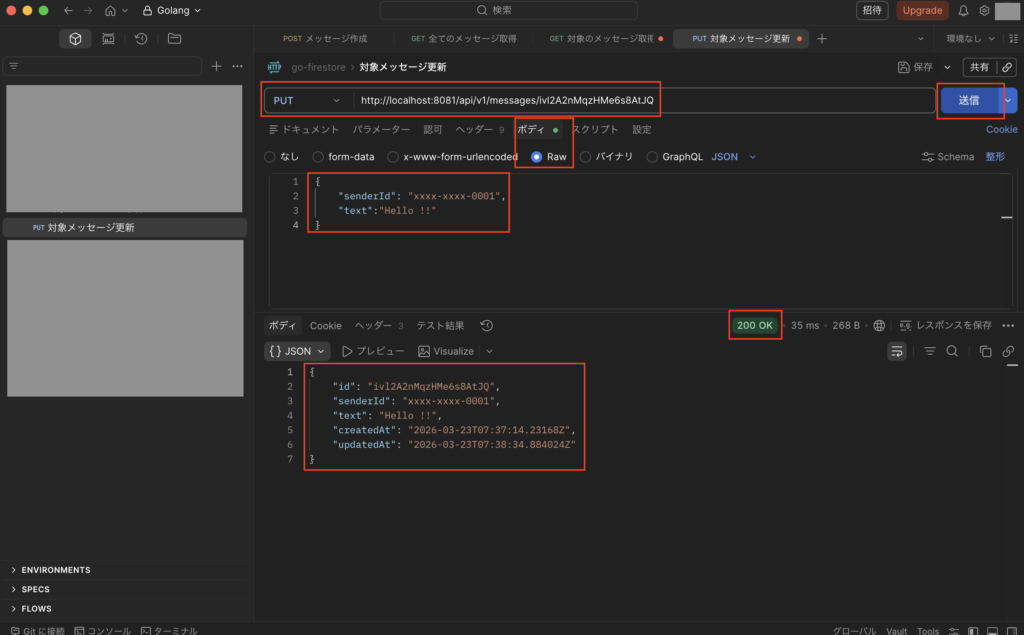
次にPUTメソッドで「http://localhost:8081/api/v1/messages/{対象データのid}」を実行し、下図のようにステータス200で想定通りの結果になればOKです。
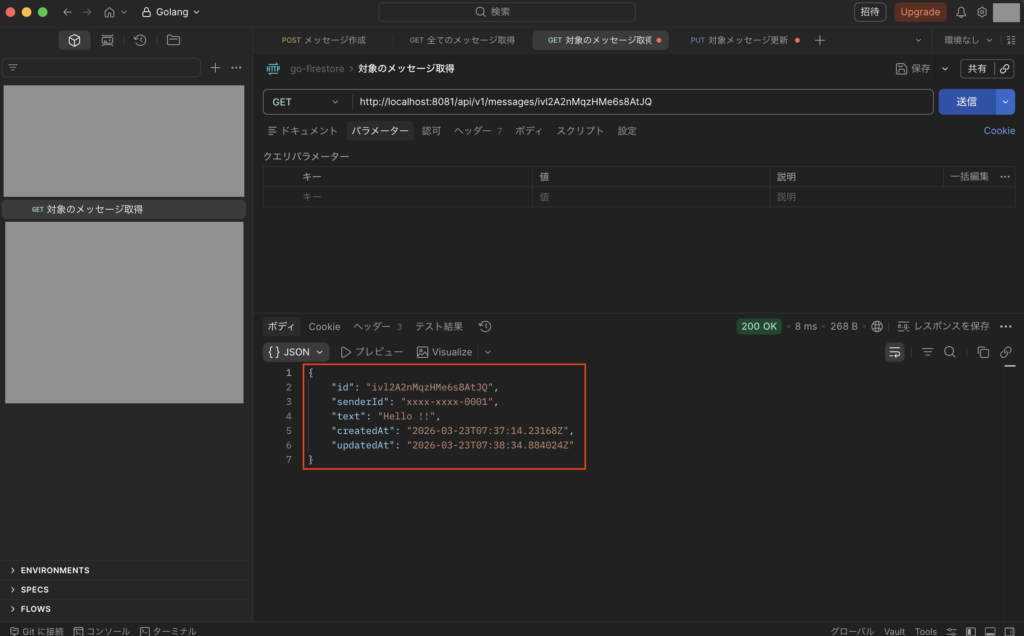
次に再度GETメソッドで「http://localhost:8081/api/v1/messages/{対象データのid}」を実行し、下図のようにステータス200で想定通りの結果になればOKです。
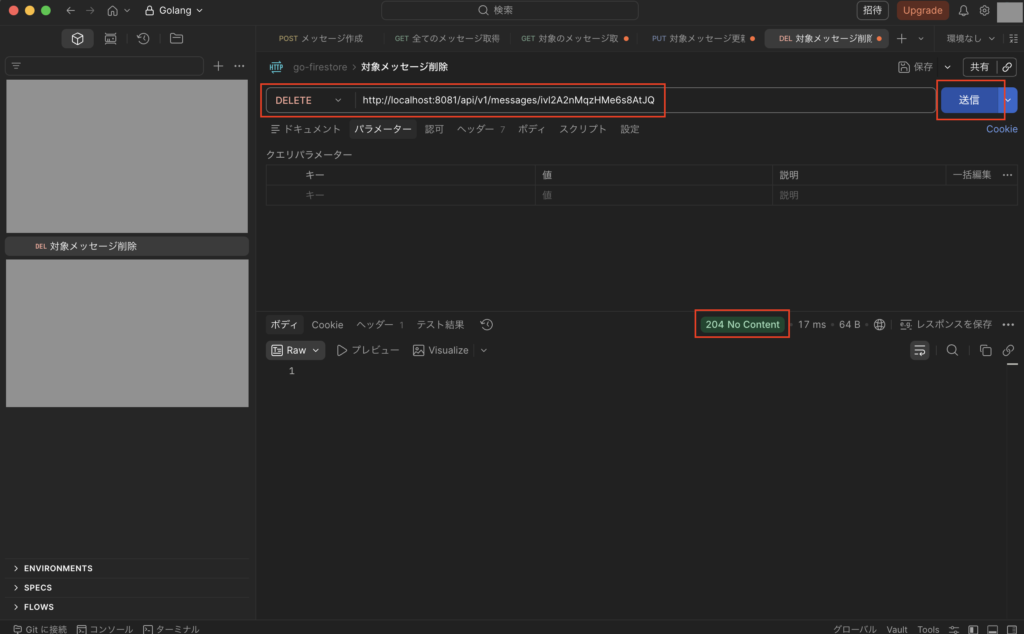
次にDELETEメソッドで「http://localhost:8081/api/v1/messages/{対象データのid}」を実行し、下図のようにステータス204で想定通りの結果になればOKです。
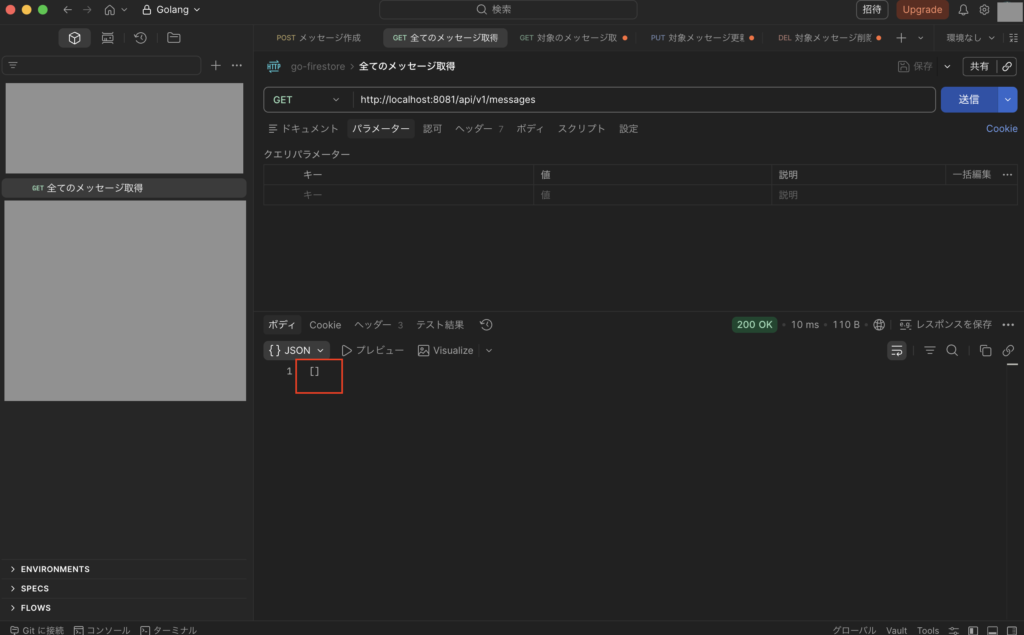
次に再度GETメソッドで「http://localhost:8081/api/v1/messages」を実行し、下図のようにステータス200で想定通りの結果になればOKです。
DBとしてCloud Firestoreを利用する際の注意点
Google Cloud Firestoreは導入コストが低い点もあり、MVP(Minimum Viable Product)などの初期開発で利用されることも多いですが、一般的なRDBと比較すると以下のような違いもあるため、その点は注意しましょう。
設計思想
・データ整合性はアプリ側で担保する必要あり
・型・バリデーション設計が重要
データ構造
・非正規化前提(データ重複を許容)
・1ドキュメントで完結する設計が基本
データ階層
・深いネストは管理が複雑になる
・アクセスパターン基準で設計する
※アクセスパターン基準とは、DBが「どのようにデータを読み書きされるか」を事前に洗い出し、その読み書きの効率を最大化するようにデータ構造やテーブル設計を決める手法です。
クエリ制約
・クエリパターンを事前に設計する必要あり
・複合インデックス設計が必須になるケースあり
トランザクション
・同一ドキュメントへの更新集中(ホットスポット)で競合が発生しやすい
・トランザクション依存の設計は避ける
パフォーマンス・課金
・無駄なreadがコスト増につながる
・ページネーション・キャッシュ設計が重要
※Firestoreでは、limit()とstartAfter()(またはstartAt())を使用したカーソルベースのページネーションが推奨されています。
リアルタイム機能
・listenerの貼りすぎでコスト・負荷増
・必要最小限の監視設計が必要
まとめ
Google Cloud Firestoreについては、コストを抑えやすくて初期開発などで魅力的な選択肢になったりしますが、その一方で後からクエリの制約やデータ設計の難しさに直面し、「最初からRDBにしておけば。。」となるようなケースも多かったりするので注意しましょう。
NoSQLは適切なユースケースで利用するなら非常に強力ではあるので、その点に注意しながら適切なDBを選択するのが大事です。
最後に
今回はGo言語(Golang)でGoogle Cloud Firestore(NoSQL)の使い方についてまとめました。
WebサービスにおけるDBの基本としてはやはりRDBですが、特定のユースケースにおいてはNoSQLを使った方がいい場合もあるため、Firestoreなどのサービスについても理解しておくとよいです。
今回は基本的な使い方についてまとめたので、興味がある方はぜひ参考にしてみて下さい。

コメント